Introduction and installation

Introduction
The cxnet package extends igraph module with some functionality. (Some functionality is available with NetworkX module as well.) Function plotting needs matplotlib (pylab).
Functionalities:
- Creating network from the deb software package hierarchy.
- Investigating and plotting degree distribution.
- Graph methods:
- to list the vertices with most degrees,
- to plot the neighbours of a vertex.
Mail to the author

Requirements
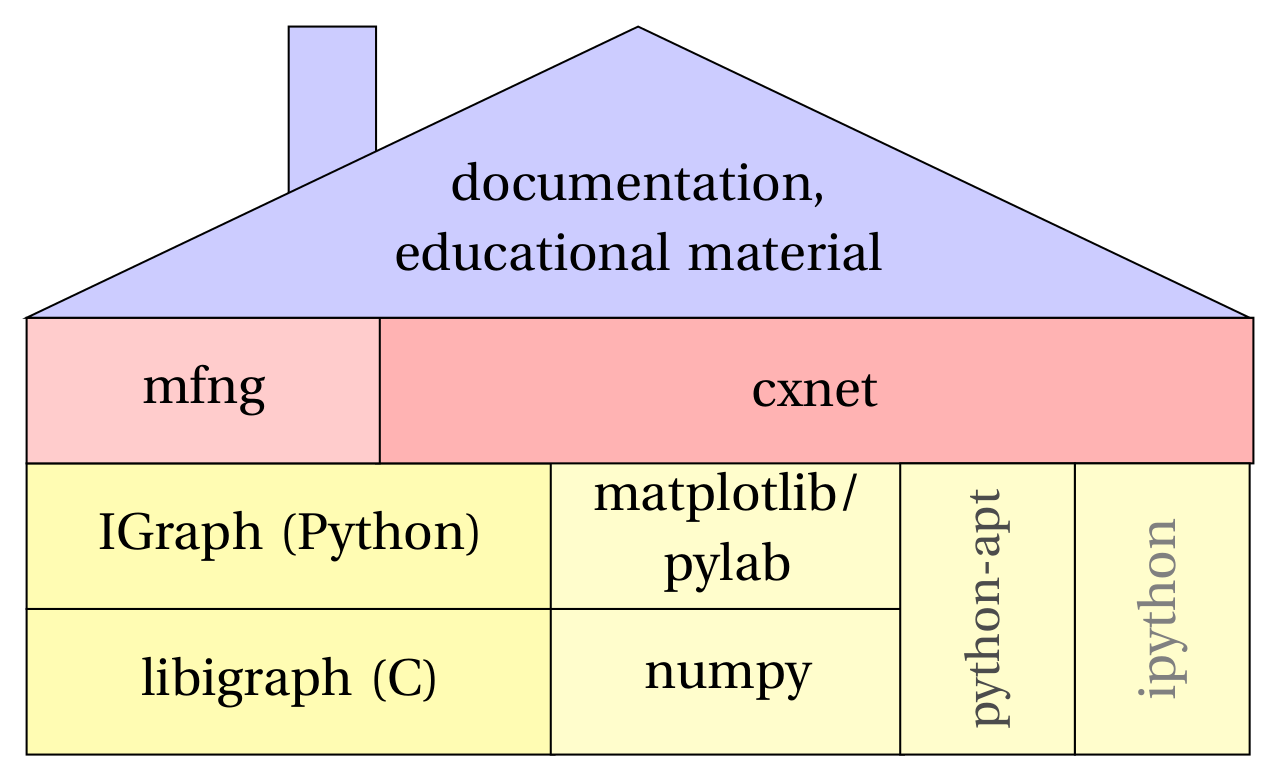
The dependencies of the cxnet package
To most of the functionality of cxnet you need to have igraph or NetworkX installed. We prefer igraph. The NetworkX version might be outdated.
Some functionality needs:
- the matplotlib plotting tool (including pylab), if you want to plot functions,
- the ipython interactive Python shell
- python-apt, if you want to create deb software package dependency network
cxnet needs Python 3.
Installation
To use cxnet you do not need mfng, but if you want to analyze the results of the mfng generated probability measures, you need cxnet.
This section describes the installation on the recent versions of Debian and Ubuntu. On other distributions of Linux perhaps the packages have slightly different names. On Windows the installation method is more difficult. If you can not figure out how, ask the author for help.
Step 1.
Install igraph:
pip3 install python-igraph
Step 2. You need to have the git version control system, otherwise you can use only the older version (next section). On Debian and Ubuntu you can get the git and some other useful packages with the commands:
sudo apt-get install git gitk
sudo apt-get install ipython python-matplotlib python-apt
Step 3.
You can install the cxnet using pip:
pip3 install cxnet
You can download the cxnet and mfng separately from the github
repository:
git clone http://github.com/horvatha/cxnet
git clone http://github.com/horvatha/mfng
If you have administrator privilege, you can install the cxnet globally (you do not need sudo if you logged in as root):
cd cxnet
sudo python setup.py install
cd ~/mfng
sudo python setup.py install
Step 4.
If you want to update, you must be in one of the subdirectory of the
(outer) cxnet or mfng directory (that you want to update) you
created now, and type:
git pull
sudo python setup.py install
Instead of the Step 3, you have an alternative method, if you install python-setuptools:
sudo apt-get install python-setuptools
cd cxnet
sudo python setup.py develop
cd ~/mfng
sudo python setup.py develop
In this case the “git pull” is enough, if you want to update (in Step 4). This method is better, if you want to develop cxnet or mfng.